Built for cosmetics, general and kiryana stores in Pakistan
You know your shop.
This knows your numbers.
A till that sells in seconds, keeps the udhaar book for you, and tells you every evening exactly what should be in the drawer — and why.
No card, no phone call · Working in a minute · From Rs 1,500 a month after
Does this sound like your shop?
Four things every shopkeeper says
If none of these is your shop, you do not need us. If two of them are, read on — that is exactly what this was built for.
“I don’t know what I made today until I count the drawer at night — and it never matches.”
Every rupee that goes in or out is written down as it happens. At closing the screen shows what should be there and where each figure came from, line by line.
“The udhaar copy is full. I can’t remember who took what, or when.”
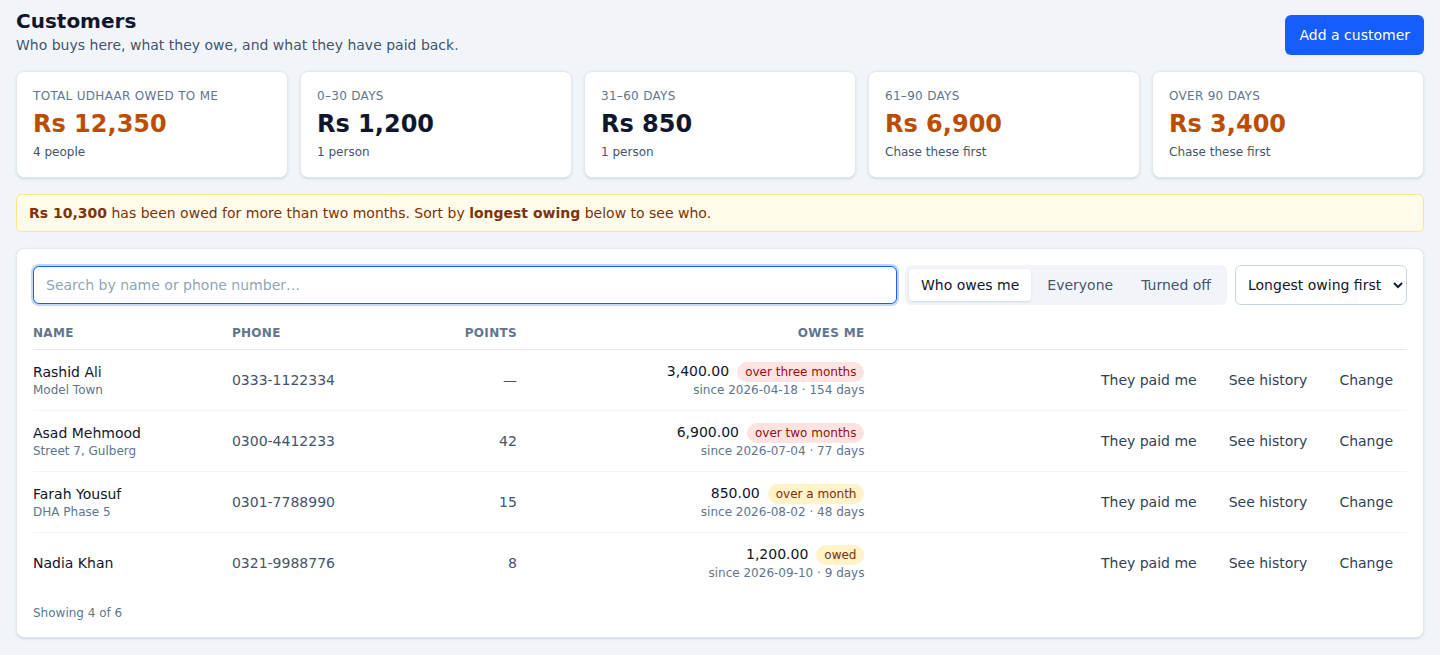
The udhaar book adds itself up. Search a name or a phone number and read every item he took and every rupee he paid back — while he is standing there.
“Things run out and I find out when a customer asks for them.”
Tell it the level you want to be warned at, and Stock says what has finished and what is running low the moment you open it.
“I know what sells. I don’t know what actually earns.”
Two lists, side by side: what sells the most, and what makes you the most money. They are rarely the same, and the difference is where the money is.
At the counter
Three things, and the customer is gone
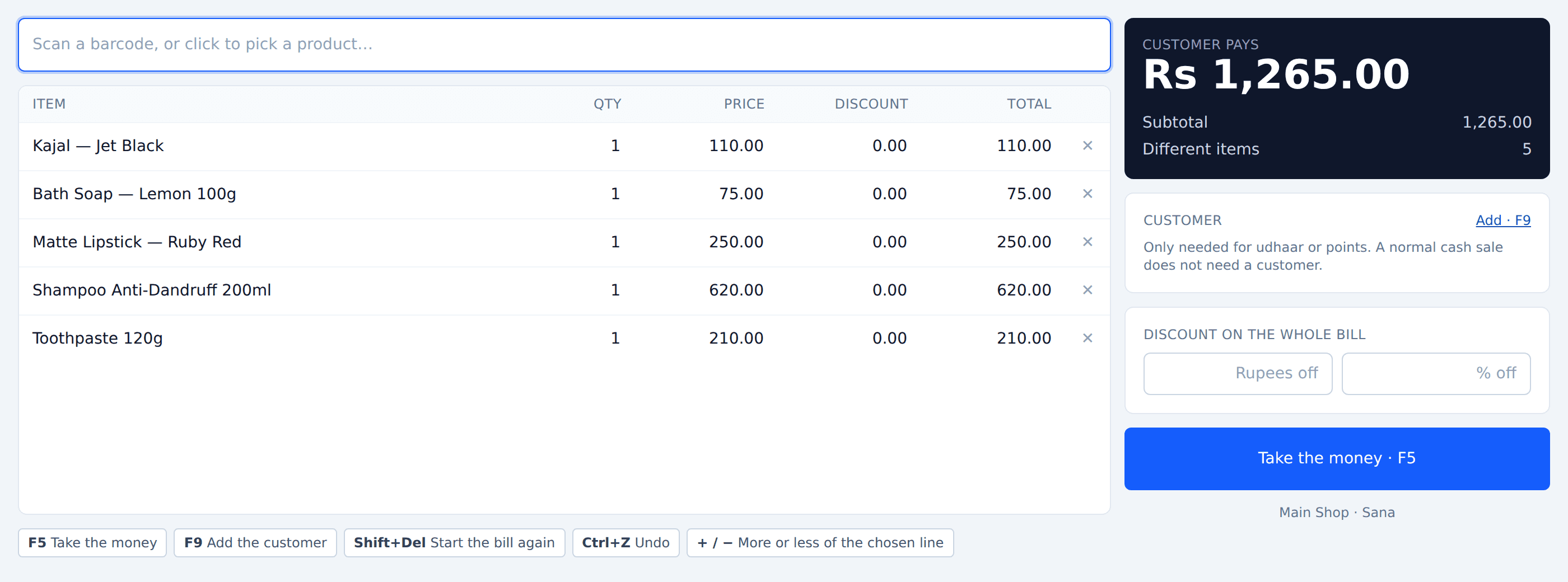
A queue does not wait for software. Scan or search, take the money, print. Everything else — the stock, the udhaar, the day’s figures — happens behind that, without anybody typing it twice.
Scan it, or type two letters
A barcode scanner works out of the box. For the loose things with no barcode — kajal, soap, a comb — type any two letters of the name, or tap it from the row of your fastest sellers.
Take the money
Cash, Easypaisa, JazzCash, card, or some of each. The change is worked out and shown big enough to read across the counter. Going on udhaar? Type what he handed over and the rest goes on his account by itself.
Done
The receipt prints. The stock comes down. The drawer goes up. His account is updated. One bill in about eight seconds, and nothing to remember afterwards.
The udhaar book
The copy that adds itself up
This is the part you will judge us on, so here is exactly what it does.
- Every balance is the sum of its lines. Nothing is stored as a total that could quietly drift. Turn the screen round and read him every item and every payment, with what he owed after each one.
- Aged from when the debt actually started. A regular who buys weekly and pays something monthly is not “nine days late”. The clock runs from the last time his account was clear — and paying a little does not reset it.
- It tells you who to chase. 0–30, 31–60, 61–90, over 90 days, with a line at the top saying how much has been sitting for more than two months.
- Money coming back is not a sale. It moves his account and the drawer, and nothing else — so your sales figure stays a sales figure.
Closing time
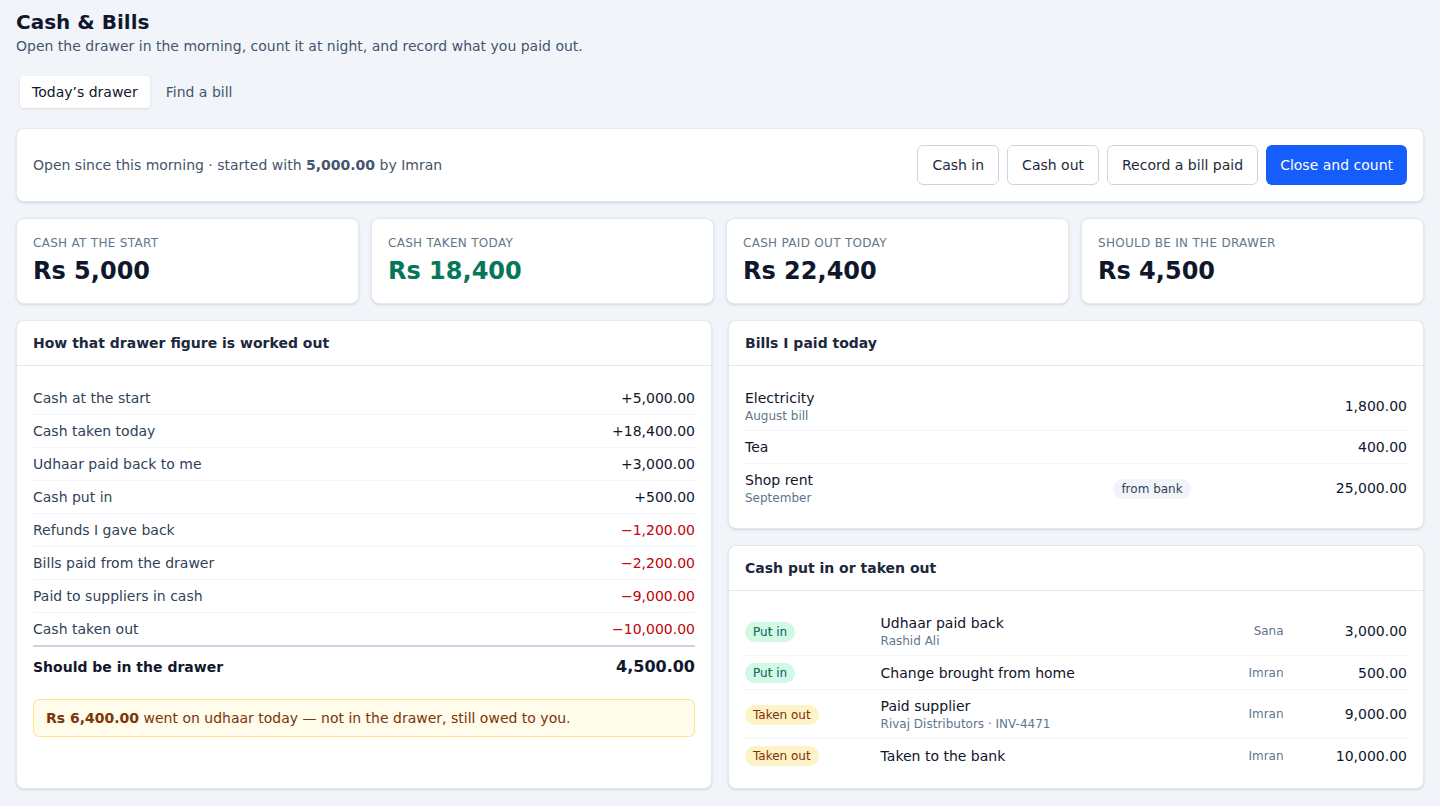
“Where did that figure come from?”
When the drawer is short, that is the only question worth asking — and software that cannot answer it gets blamed, or gets somebody blamed.
So the expected figure is never shown on its own. The working sits next to it: what you opened with, what came in over the counter, what a customer paid back, what went to the distributor, what you paid the electricity with, what went to the bank. Eight lines, adding to the number at the bottom.
What you actually kept
Sales are not profit, and you know it
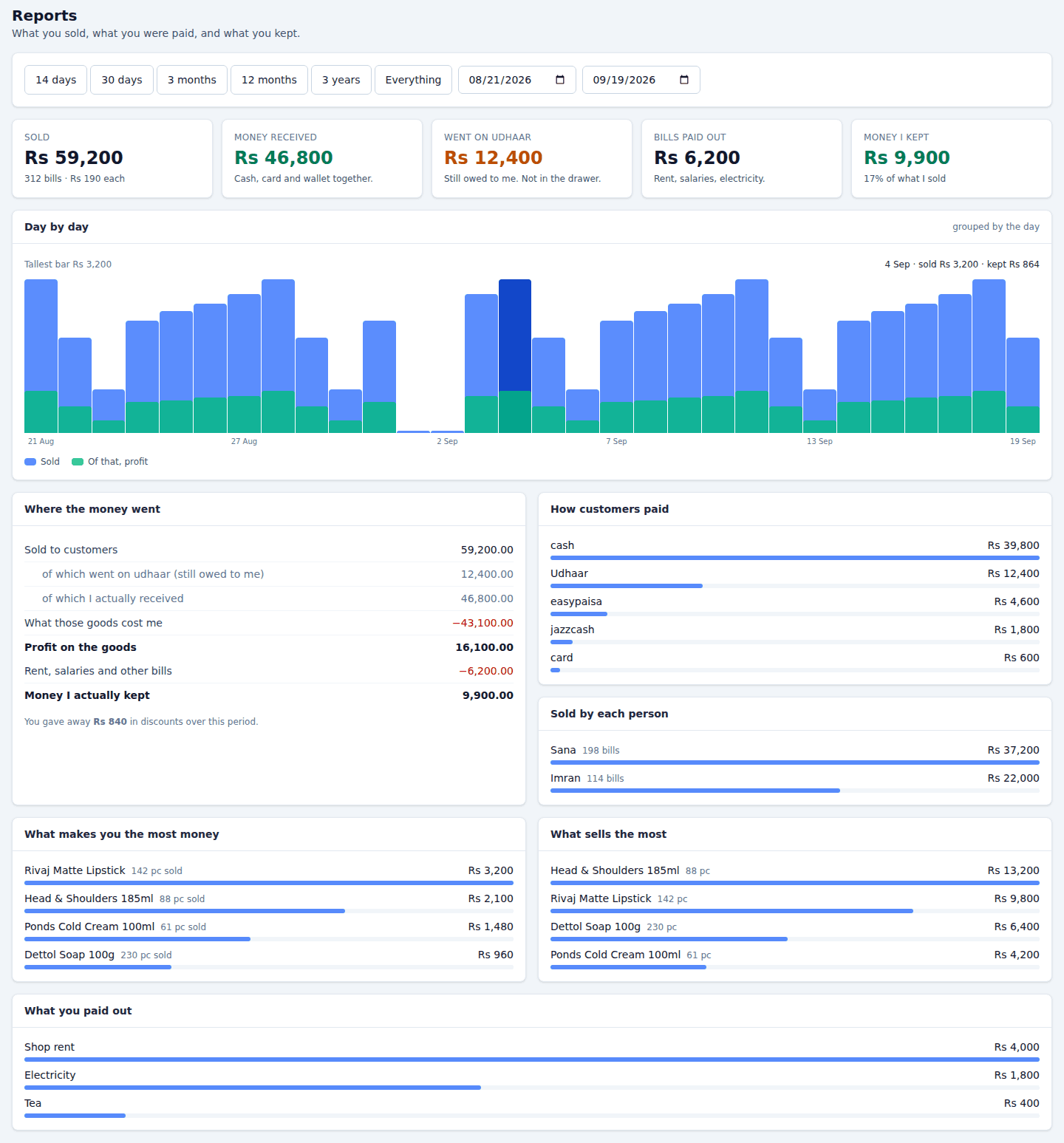
Pick any stretch — this week, last Ramzan, three years — and read it downward: what went out of the door, how much of it you were actually paid, what those goods cost you, what was left after the rent.
What sells vs what earns
Two lists side by side. The soap that flies off the shelf and the cream nobody notices are rarely in the same order — and the difference is where your money actually is.
Money stuck on the shelves
What your stock cost you, sitting there. Plus what has finished, what is running low, and what is close to its expiry date.
Who sold what
Takings by person and by counter. Not to catch anybody out — so you know which shift is worth staffing properly.
The part people worry about
It is your shop’s book. You can walk out with it whenever you like.
Somebody has promised you a backup before. So we do not ask you to take our word for it — there is a button in your settings, and it gives you everything.
One button, one Excel file
Your items and prices, stock, customers and what they owe, suppliers, every bill with its lines, everything you bought, the cash and the expenses. Opens in Excel. Take it monthly.
Backed up every night
By us, automatically, and kept somewhere other than the server it runs on. You do not have to do anything, and you do not have to rely on us doing it.
Stop paying and it stays
The till stops making new bills. Nothing is deleted, nothing is locked — every figure stays there to read and to download.
Not translated — built here
It works the way your shop already works
Most till software is written for a supermarket in another country and has udhaar bolted on to the side. This was written the other way round.
Udhaar, properly
Not a bolted-on “credit account”. Part cash and part on the book in one go, aged from when the debt actually started, with a statement you can turn round and show him.
Cash, Easypaisa, JazzCash, card
All on one bill, split however he pays. Totals round to the nearest rupee, because nobody here has coins.
A PIN, not a password
Your boy at the counter types four digits. Asking him to type an email address forty times a day between customers is how a system gets abandoned.
The thermal roll you already buy
58mm or 80mm, set per counter. The receipt prints to the edge of the paper, not off it.
Two shops, one book
One product list and one udhaar book across branches. Separate stock, separate drawer, separate evening count — because each counter has to balance on its own.
Works in Urdu
Every screen, right to left, with the numbers still reading left to right. Switch it per person, so the owner can work in English and the counter in Urdu.
Price
One monthly figure. Nothing on top.
No setup fee, no licence, no charge per bill. Try it yourself for 3 days without speaking to anybody, or 14 days free with your own items once we have set them up for you. No card either way.
Pay how you already pay. Bank transfer, JazzCash or Easypaisa. Tell us the reference and your date moves forward.
Pay early, lose nothing. It adds to the date you are paid up to. Pay late and it starts the day it is recorded — you are not charged for days the till would not sell.
Stop whenever. No contract and no notice. Your figures stay yours, and you can download the lot on the way out.
Before you ask
The questions everybody asks
Including the one most companies leave off their website. If yours is not here, send it on WhatsApp — a person will answer.
What if the internet goes down?
Being honest: this version needs internet, because your shop’s figures live on our server so you can see them from home. If your area’s connection is bad, ask us about the offline version — it runs entirely on the shop’s own computer and needs no internet at all.
My staff are not computer people. Will they manage?
Selling is three things: scan, take the money, done. A cashier signs in with four digits and sees one screen. Prices, stock and the profit figures are not on it — he cannot change what he is not shown.
Is my data safe? Can I get it out?
Yours, and you can take it any time. One button gives you an Excel file of everything — items, stock, customers, every bill, the udhaar book. We also back up every night, and keep the copy somewhere other than the server it runs on.
What happens if I stop paying?
The till stops making new bills. Nothing is deleted and nothing is locked — your sales, your stock and your udhaar book stay there to read and to download, and selling starts again the moment you renew.
Do I need a card to start?
No card, and no card ever. You get 14 days free. After that you pay by bank transfer, JazzCash or Easypaisa and we move your date forward. Pay early and no day is lost; pay late and you are not charged for days the till would not sell.
Can I use it for two shops?
Yes. Both share one product list and one udhaar book, so a regular who owes money at one owes it at the other. Stock, bills and the cash drawer stay separate per counter.
How long does setting up take?
An afternoon. We put your items in for you — send us your list in any shape, even a photo of the register — and you start selling the same day.
What do I need to buy?
Any computer from the last ten years and a browser. A barcode scanner and a thermal printer if you want them, but you can start without either and add them later.
Bring your item list. Sell a real bill in ten minutes.
Send us what you sell in any shape you have it — a spreadsheet, a WhatsApp message, a photo of the register — and we will set it up and show you on your own numbers. No charge and nothing to sign.
Or call 0300-0000000 · hello@example.pk